What “smart home” has to mean on this page
Every charger in this category calls itself smart, so the word is useless as a filter. Before any picks, here is what we ranked on — five questions, each answerable from a manufacturer’s own published page rather than from a reviewer’s impression.
One: does the maker publish a named platform or assistant?Alexa, Siri, Google Home, Apple Home, Matter, Home Assistant, IFTTT, a public API. Not “works with your smart home” in marketing copy — a named thing we can point at. This is the question the category mostly fails.
Two: does it publish an open protocol? OCPP is the one that exists here. A proprietary cloud is not a defect, but it means your integration options are permanently whatever that vendor decides they are.
Three: how does it get on the network? A garage is the worst room in the house for WiFi, and most of these chargers want 2.4 GHz specifically. An Ethernet port is worth more than three app features, and exactly one unit here has one.
Four: what does whole-home energy management cost in hardware? Several brands advertise panel-aware charging and solar matching. Read the footnotes: most of them need a second device you buy separately. We have put the footnote in the table instead of the headline.
Five: what happens when the network drops? The feature nobody markets. A charger that stops charging, loses its schedule or forgets its session history when the WiFi hiccups is a worse charger than one with no WiFi at all.
What each brand actually publishes
This is the table the category does not want to print. Every cell is read from the manufacturer’s own pages on a dated visit, and an empty answer is recorded as an absence rather than filled in from a forum.
What each manufacturer publishes about controlling the charger from outside its own app, read from the brand’s own pages on the dated visits in our sources. “Not published” means exactly that — the brand does not state it, and we do not infer it from a community project or a marketplace listing. No charger in this table publishes Matter, Apple Home / HomeKit, Google Home or Home Assistant support, so there is no column for them.| Charger | Voice control | Open protocol | Network | Whole-home energy |
|---|
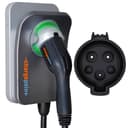
| ChargePoint Home Flex | Alexa, Siri | Not published | WiFi (2.4 / 5 GHz) | Utility connections; 90 days of sessions stored locally |
|---|
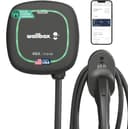
| Wallbox Pulsar Plus | Not published | OCPP 1.6j | WiFi, Bluetooth | Static + dynamic load management, solar (power meter accessory) |
|---|
| Emporia Pro | Not published | Not published | WiFi | PowerSmart, excess-solar and peak-demand management (Vue monitor) |
|---|
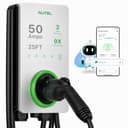
| Autel MaxiCharger Home 50A | Not published | Not published | WiFi, Bluetooth, Ethernet, CAN, RS485 | ALM (extra hardware) + charger-to-charger DLB (no extra hardware) |
|---|
| Grizzl-E Classic Connect 40A | Not published | Not published for this model | WiFi (2.4 GHz) | Utility demand-response programs in the app |
|---|
| Grizzl-E Ultimate 48A | Not published | OCPP | WiFi (2.4 GHz) | Utility demand-response programs in the app |
|---|
| EVIQO 48A | Not published | Not published | WiFi (2.4 GHz) | Amperage set in the app (6-48 A); no load management published |
|---|
Three things stand out. The voice column has one entry. ChargePoint publishes Alexa and Siri on its own app page; nobody else publishes a voice claim at all. The open-protocol column has two.Wallbox publishes OCPP 1.6j in its North America datasheet, and Grizzl-E publishes OCPP on both of its Ultimate 48A pages as of our October 17, 2026 reading — a change from our September reading of the same spec page, which published no connectivity for that unit at all. Note that Grizzl-E publishes OCPP for the Ultimate and not for the Classic Connect, so this is a model-by-model answer rather than a brand-wide one. And the whole-home column is mostly footnotes:Emporia’s features are gated behind the Vue monitor, Wallbox’s solar behind a power meter accessory, Autel’s whole-home ALM behind “compatible additional hardware” — though Autel publishes charger-to-charger load balancing as needing none.
The four routes in, and what each one actually buys you
Voice controlsounds like the headline feature and is the least useful of the four. “Alexa, start charging” is a party trick next to a schedule that runs every night without being asked. It earns its place for one real case: asking whether the car is plugged in without walking to the garage, which is a question people genuinely have at bedtime.
An open protocolis the one that matters if you run your own dashboards. OCPP was designed for public and fleet networks, not houses, which is why so few home units publish it — and why the two that do are interesting to anyone with a home energy system. Go in clear-eyed: publishing OCPP is not a promise that a particular third-party platform will work on the first try, and Wallbox explicitly notes that its solar charging is not compatible with OCPP. Confirm the model and firmware before buying on this basis.
A wired networkis the unglamorous winner. Most “my smart charger is useless” stories are WiFi stories: a 2.4 GHz radio at the far end of a house, behind a block wall, next to a steel door. Autel’s Ethernet port removes the entire problem if you can get a cable there — and if you are building or remodeling, pulling a data line to the charger location costs almost nothing while the wall is open. That is one of the rough-in items on our new-construction page, and the connectivity guide covers the retrofit version.
The maker’s own ecosystemis the deepest integration available today, with the obvious catch that it is a walled garden. Emporia is the clearest example: with its Vue monitor installed, the charger can be managed against whole-home demand, enrolled in peak-demand management and pointed at excess solar. That is real, published capability that no amount of OCPP gets you — and it is only available in Emporia’s own world, with Emporia’s own hardware.
There is a fifth route worth naming because it is where the money is: your utility’s program.Managed-charging and demand-response programs pay drivers to let the utility shift charging, and enrollment usually requires a connected charger — frequently an ENERGY STAR certified one. Autel publishes OpenADR 2.0b on its 80-amp unit, which is the protocol those programs speak. Our utility rebates page is where to check what your own utility runs, and it is a better use of a smart charger than any voice command.
The picks, in plain terms
The ChargePoint Home Flexwins because it is the only unit here whose maker publishes voice control, and because the rest of the package backs it up: output adjustable 16 to 50 amps in the app, over-the-air firmware, 2.4 and 5 GHz WiFi, up to 90 days of session data stored locally if the network drops, and a 3-year warranty. Honest cons: you pay a premium for it, the full 50 amps is a hardwired-only figure on a 60-amp circuit, and ChargePoint publishes no OCPP and does not name Google Home or Matter anywhere — so if your house runs on Google rather than Amazon or Apple, the one differentiator on this page does not help you. Read the review.
The Wallbox Pulsar Plusis the pick for an open protocol: OCPP 1.6j published on Wallbox’s own datasheet, plus static and dynamic load management and solar charging, and a genuinely small body — 7.8 by 7.9 inches and 4.4 pounds without the cable. Honest cons: it is the most expensive unit here, the load management and solar features are footnoted “may require power meter accessory”, solar charging is explicitly not compatible with OCPP or multi-charger installs, and Wallbox publishes an operating range topping out at 104°F, the narrowest on this page. Read the review.
The Autel MaxiCharger Home 50Ais here for the Ethernet port, and for the widest published temperature range we track: −40°F to 131°F, IP65 / NEMA 4X, with WiFi, Bluetooth, Ethernet, CAN and RS485 all published. Charger-to-charger dynamic load balancing needs no extra hardware, which is unusual. Honest cons: Autel’s own page specifies a 70-amp circuit for full output, whole-home ALM needs additional hardware, the page publishes CSA and ENERGY STAR compliance without claiming a UL listing, and no voice or smart-home platform is published. Read the review.
The Emporia Prois the pick if what you mean by smart home is “I want the house to manage the car.” PowerSmart comes standard on the Pro, and with the Vue monitor you get peak-demand management and excess-solar charging, plus Intelligent Load Sharing between multiple chargers. Honest cons: four of its five headline features are footnoted as requiring the Vue monitor, nothing outside Emporia’s own ecosystem is supported or published, and 48 amps means a 60-amp circuit. Read the review.
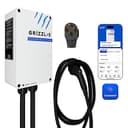
The Grizzl-E Classic Connect 40Ais the cheapest connected charger on this page, and the only one of our picks you can unplug: a NEMA 14-50 plug, WiFi and the Grizzl-E Connect app for scheduling, usage history, remote lockout and utility demand-response programs, in the cast-aluminum IP67 body rated −22°F to 122°F with a 25-foot cold-flexible cable and a J1772 or NACS connector. Honest cons: 40 amps is the plug-in ceiling, the amperage is set by a physical DIP switch rather than in the app, Grizzl-E publishes no ENERGY STAR certification for it — which can cost you a utility rebate — and no OCPP is published for this model, which is the one place its bigger sibling now goes further. On our October 17, 2026 reading, Grizzl-E’s own Ultimate 48A pages publish WiFi, the Connect app and OCPP, where our September reading of the same spec page published no connectivity at all. If OCPP is the reason you are here, that unit is the one to look at — and to confirm the SKU on, because the Amazon listing we link for it does not mention an app. The EVIQO head-to-head goes through all of it, and the Classic Connect review covers the pick itself.
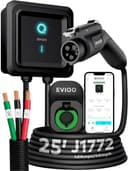
The EVIQO 48A is the honest value answer for anyone who, having read the table, has concluded that one good app is enough: UL and ETL, ENERGY STAR for the rebate form, IP66 / NEMA 4, a 25-foot cable with a 40-inch input lead, scheduling, cost tracking, over-the-air updates and a 6-to-48-amp slider. Honest cons: no protocol, no API, no voice, no integration of any kind published; the 50-amp DIP setting its page mentions wants a 70-amp circuit; and its published speed claims contradict each other four ways. Read the review.
Two things worth doing instead of chasing integration
Let the car do the scheduling.It is free, it already works, and it survives a WiFi outage. Set the departure time or the off-peak window in the vehicle, and the single most valuable automation in this whole category is done. Charger-side schedules are then a backup rather than the plan — which is the right way around, because the car always knows its own state of charge.
Spend the integration budget on the circuit instead. Across every charger on this page, the thing that most changes your charging experience is amps and reach: a 60-amp circuit instead of a 50, a longer cable, a charger mounted where the car actually parks. Our install-cost breakdown and placement guide are both better reading than any app feature list, and the choosing guide puts the whole decision in order.