Getting WiFi to Your EV Charger
Nobody thinks about signal until the charger is on the wall and the app says offline. Concrete, foil-backed insulation and a router two floors away are a specific and solvable problem — but it is much cheaper to solve before the conduit goes in.
How this is funded: we earn a commission if you buy through our links, at no extra cost to you. It never changes which product we recommend, and we’ll tell you when we’d skip one. Full disclosure.
A charger’s WiFi is the feature people pay for and then discover they cannot use. The reason is structural, not electronic: garages are among the worst wireless environments in a house, and the charger is usually mounted on the wall furthest from everything.
This is entirely fixable, and it is much cheaper to fix before the install than after. So it belongs in the planning conversation, alongside cable reach and mounting height.
First: what you actually lose when it is offline
Worth establishing, because the answer is smaller than the anxiety suggests. The car still charges.The handshake between charger and vehicle is local — a pilot signal on a wire, not an internet transaction — and the safety functions run in the unit itself. An offline smart charger is simply a dumb charger.
What you lose is real but bounded:
- Remote control and status. Starting, stopping and checking from the app.
- Usage history and energy data. The kWh-per-session records that make cost tracking possible.
- Firmware updates. Rarely urgent, occasionally important.
- Utility program participation. This is the one that can cost money. Managed-charging programs need to reach the charger, and DOE catalogs those programs as a distinct category alongside purchase and installation rebates. If your rebate is conditional on enrollment, an offline charger is a problem.
- Cloud-hosted schedules, depending on the manufacturer. Schedules stored in the unit usually survive; ones that live in a cloud service may not.
Note what is not on that list: charging speed, safety, and the ability to schedule from the car. Almost every EV can be given a departure time or a charging window natively, which is the single most robust way to schedule anything. We argue that case in full in smart vs dumb chargers.
Why garages defeat WiFi
Four things, usually together. (If you are still choosing the charger, our garage roundup ranks each pick on what it loses when the network never arrives.) Distance— the router is in a study or a living room, and the garage is the far corner. Construction— concrete block, brick and poured slabs attenuate radio badly. Foil-faced insulation, which is close to a mirror at these frequencies and is extremely common in garage ceilings and attached walls. And the metal garage door, which is a large moving reflector.
Add the fact that a charger is typically mounted low on a wall, often partly behind a parked car — a large metal object in the signal path — and the surprise is not that it struggles, but that it ever works.
The 2.4 GHz problem, which is not a signal problem
Before assuming weak signal, check the band. Many chargers connect on 2.4 GHz only, which is the sensible choice for a device that needs negligible bandwidth and maximum wall penetration.
Modern routers often present 2.4 and 5 GHz under a single network name and steer devices between them. That steering is helpful for phones and unhelpful for chargers: the unit can fail to pair even where the signal is perfectly adequate. The standard fixes are to split the bands temporarily during onboarding, or to create a dedicated 2.4 GHz guest network the charger stays on permanently.
Two smaller pairing gotchas worth knowing: many units will not join a network whose name or password contains unusual characters, and some struggle with captive-portal or enterprise-authentication networks entirely. Neither is a fault, and both waste an evening if you do not know to look.
The fixes, cheapest first
1. Move the router, or its antennas. Free. Surprisingly often enough, particularly if the router currently sits inside a cabinet or behind a television.
2. Add a mesh node or access point on the house side of the garage wall. The best value fix by a distance. Place it in the room adjoining the garage rather than in the garage itself — a node inside the garage inherits exactly the same problem it was bought to solve, because its own backhaul has to cross the same wall.
3. Run Ethernet, if the charger supports it.The permanent answer. Some units list a wired port alongside wireless — Autel’s MaxiCharger models publish Ethernet as well as WiFi and Bluetooth — and where a route exists it removes the entire category of problem. If your garage is a known dead spot, make wired support a buying criterion rather than a hopeful extra.
4. Powerline adapters.The fallback where no cable route exists. They work by sending data over the house wiring, and performance depends heavily on that wiring — a garage on a different branch circuit can be poor. Worth trying if returnable, not worth planning around.
5. Accept it and schedule in the car.Genuinely valid. If the signal problem is expensive to solve and your car schedules charging natively, the app was never load-bearing. This is also the point at which a deliberately offline charger starts to look sensible — see our no-app roundup.
Plan it before the conduit goes in
The cheap moment to solve this is during the install planning, not afterwards — and for a separate building it is the moment to put a Cat6 in the trench, which our detached-garage guide covers. Two concrete suggestions:
Take a phone to the exact mounting position and check the signal there, at car height, with the garage door closed. Not at the doorway, not standing up — the conditions the charger will actually live in.
And if you are having conduit run anyway, ask about pulling a Cat6 alongside it or leaving a pull string. The marginal cost while the electrician is already there is small; retrofitting later is a separate job. This applies double for a detached post or pedestal, which is both further from the router and usually behind more obstruction.
Chargers that make this easier
Quick picks
Ranked on published specs, charging speed, electrical fit and value. Select a row to jump to the full write-up. We have not bench-tested these chargers — here is exactly what we do instead.
| # | Product | Best for | Price |
|---|---|---|---|
| 1 | 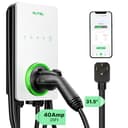 Autel MaxiCharger AC Elite Home 40A Autel's weather-hardened hardware in the install almost everyone can actually have. It is the 50A MaxiCharger's smaller sibling: same 25 ft cable and app, same NEMA 4 body, but it ends in a NEMA 14-50 plug instead of a wire nut — so it goes on an existing outlet, comes off the wall when you move, and needs a 50-amp circuit rather than a 60. The in-body holster is a small thing that stops mattering only if you have never coiled a cold cable. | Ethernet as well as WiFi and Bluetooth | |
| 2 | 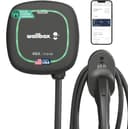 Wallbox Pulsar Plus The one to buy when wall space is tight: it's among the smallest 48A units you can get, with dynamic load management so it can share a circuit without tripping the main. A polished premium charger — and priced like one. | Bluetooth control when WiFi is out of reach | |
| 3 | 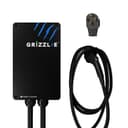 Grizzl-E Classic A deliberately dumb charger, and that is the point: no app, no cloud account, no firmware to fail — just a die-cast aluminum box built for a Canadian winter and rated to keep working outdoors. It went missing from Amazon for most of September 2026 and is listed again as of our 2026-09-28 check. If you want the same build with a WiFi radio in it, that is the Classic Connect. | Nothing to connect, nothing to drop |
The Bluetooth point deserves a note. A unit with Bluetooth as well as WiFi can be configured and controlled from a phone standing next to it, which covers a decent share of what people actually want from an app and works with no network at all. It will not satisfy a utility managed-charging program — those need real connectivity — but for a household that just wants to change the amperage occasionally, it is often enough.
Frequently asked questions
Do EV chargers need WiFi to work?
No. A smart charger that loses its connection still charges — the safety and control functions run locally in the unit and in the car, and the charging handshake does not involve the internet at all. What you lose is remote control, usage history, firmware updates and any utility program that depends on the charger being reachable.
Why won't my EV charger connect to my WiFi?
Most often signal strength, then band. Garages are hostile to wireless — concrete, masonry, foil-faced insulation and metal doors all attenuate the signal — and many chargers connect only on 2.4 GHz, so a network that only advertises 5 GHz, or a combined network that steers devices to 5 GHz, can fail to pair even where signal is adequate.
Should I use 2.4 GHz or 5 GHz for a charger?
2.4 GHz, almost always. It penetrates walls far better than 5 GHz and a charger needs a trivial amount of bandwidth. If your router combines both bands under one name, the usual fix is to split them temporarily or create a dedicated 2.4 GHz guest network for onboarding.
Can I run an Ethernet cable to an EV charger?
Some chargers support it — Autel's MaxiCharger units list Ethernet alongside WiFi and Bluetooth, for example. Where a unit supports it and a cable route exists, it is the most reliable option by a wide margin and removes the whole problem permanently. Not all chargers offer it, so check before buying if your garage is a known dead spot.
Will scheduling still work if the charger is offline?
It depends where the schedule lives. A schedule stored in the charger will usually keep running; one that depends on a cloud service may not. The robust answer is to schedule in the car instead — almost every EV can be told a departure time or a charging window natively, and that works regardless of what the wall unit can reach.
Is a mesh node or extender in the garage worth it?
Usually the best value fix. A single mesh node or access point placed on the house side of the garage wall — not inside the garage, where it inherits the same problem — typically resolves it for well under the cost of the charger. Powerline adapters are the fallback where no ethernet route exists, with the caveat that performance depends on your house wiring.
Sources
- Autel Energy — MaxiCharger AC Elite Home 40A (NEMA 14-50) product page — Autel's own listing: output adjustable up to 40 A / 9.6 kW, SAE J1772 connector on a NEMA 14-50 input cord, 25 ft cable, NEMA 4 enclosure, Wi-Fi / Bluetooth / Ethernet, three-year limited warranty; the page does not publish a UL or ENERGY STAR listing or an operating-temperature range (accessed August 18, 2026)
- United Chargers — Grizzl-E Classic Connect 40A product overview — Grizzl-E's own overview for the Classic Connect: 'the Wi-Fi Connected Smart Level 2 EVSE for home use' at 40A / 9.6 kW, shipping with the Grizzl-E Connect app for charging statistics, schedules, Demand/Response utility programs, remote control, lockout to prevent unauthorized use, updates and diagnostics; a UL Type 4 water-resistant cast aluminum enclosure with IP67 sealing, a NEMA 14-50 input cable and a 25 ft output cable with a J1772 or NACS connector, 'UL Tested and Certified' with built-in GFCI, over-current, over-voltage, ground-fault and over-temperature protections, and adjustable maximum current set with DIP switches at 40A / 32A / 24A / 16A for a 50A / 40A / 30A / 20A breaker. No ENERGY STAR certification and no OCPP support are published for this model (accessed September 3, 2026)
- ChargePoint — Home Flex datasheet (PDF) — ChargePoint's own datasheet: enclosure rating Type 3R per UL 50E, operating temperature -22F to 122F, 23 ft cable, plus installer notes that an outdoor plug-in install requires an outdoor-rated GFCI breaker upstream while an external GFCI may conflict with the charger's internal ground-fault protection on a hardwired install. RE-READ September 3, 2026 for the review refresh: the same datasheet also publishes maximum 12 kW (240V AC x 50A) with output amperage adjustable via the mobile app to 16A, 24A, 32A, 40A, 48A or 50A; a required dedicated dual-pole breaker rated for 125% of maximum load; 'Software Updates: Firmware updated over-the-air (OTA)'; 2.4/5 GHz Wi-Fi (802.11 a/b/g/n); local storage of up to 90 days of charging session data (100 sessions) if the network drops; power measurement accuracy +/- 2.0%; ground-fault detection by 20 mA CCID with auto retry; and UL and cUL listing per UL 2594, UL 2231-1 and UL 2231-2, NEC Article 625 compliant. Ordering information lists the plug-in station models CPH50-NEMA6-50-L23 and CPH50-NEMA14-50-L23 (accessed September 3, 2026)
- ENERGY STAR — Electric Vehicle Chargers — ENERGY STAR on EVSE efficiency: certified chargers use about 40% less energy in standby than non-certified units (accessed July 19, 2026)
- U.S. DOE Alternative Fuels Data Center — Utility Incentives — DOE's catalog of utility incentives by customer type: 114 utilities listed offering residential Level 2 charging station purchase rebates and 74 offering Level 2 installation rebates, plus make-ready/pre-wiring rebates, managed-charging programs and EV time-of-use rates. RE-READ September 3, 2026: the residential counts were unchanged at 114 participating utilities for the EV Level 2 Charging Station Purchase Rebate and 74 for the EV Level 2 Charging Station Installation Rebate, alongside 17 for the Make-Ready or Pre-Wiring Rebate for EV Chargers, 109 for the EV Time-of-Use (TOU) Rate and 9 for the EV Managed Charging Program (accessed September 3, 2026)
Keep reading
Best chargers for a smart home
Which chargers publish an Ethernet port, an open protocol or a voice assistant - ranked, with the dead-spot problem in mind.
See the picksSmart vs dumb chargers
Whether you need the connectivity at all — and why your car's own scheduler may make it moot.
Settle the questionBest smart chargers
The units where the app is genuinely worth having, and what each one actually does with it.
See smart picksBest chargers without an app
The other answer to a bad signal: buy something that never needed a network.
See offline picksWhere to mount it
Signal is one more input into a decision usually made on cable reach alone.
Plan the placement